Best Free Portfolio Website Templates: 10 Picks for 2026
Ten free portfolio website templates for designers, photographers, filmmakers and developers, with the platform costs and licence limits spelled out.
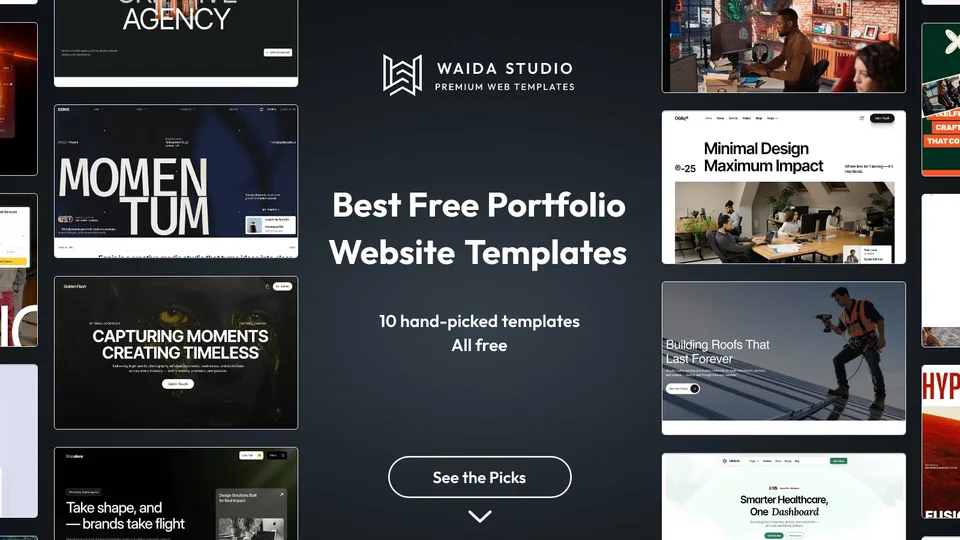
The best free portfolio website templates in 2026 are Formix and Brandora for designers and studios, Egnis and Videofolio for filmmakers, Golden Flash for photographers, Zelda if you want it free on every platform, Nora Vance for illustrators, and DevPortfolio or Astro's own portfolio starter for developers.
Bias disclosure: 6 of these 10 are Waida Studio templates; we made them. The other four are third-party templates we don't earn anything from, checked on their own pages today. Read the notes on what each one costs to publish, because a free template is not the same as a free website.
How We Picked
- Free to start from, today. Every pick was free on its own page when we checked it. Waida's free templates need a free Waida account; the Framer Marketplace picks are listed at $0; the two code starters are MIT-licensed on GitHub.
- Built for a portfolio. A work index and project pages, not a general business layout with a gallery bolted on.
- A real path to publishing. We note what the host charges, so you know the running cost before you commit.
- Range. Designers, photographers, filmmakers, illustrators and developers each get at least one pick, across Framer, Webflow and code.
The 10 Picks at a Glance
Template | Best for | Where it's free | Price |
|---|---|---|---|
Formix | Designers and small studios | Framer (Waida account) | Free |
Egnis | Filmmakers and videographers | Framer (Waida account) | Free |
Golden Flash | Photographers and visual artists | Framer (Waida account) | Free |
Brandora | Designers who publish work often | Framer (Waida account) | Free |
Zelda | Studios that want code or Webflow too | Framer, Webflow, HTML, Next.js, Astro, Figma | Free |
Obliq | Design studios with a strong visual style | Framer (Waida account) | Free |
Nora Vance | Brand designers and illustrators | Framer Marketplace | Free |
Videofolio | Video editors and motion designers | Framer Marketplace | Free |
DevPortfolio | Developers with a CV-style site | GitHub (MIT) | Free |
Astro Portfolio Starter | Developers who want a bare starting point | GitHub (MIT) | Free |
The 10 Best Free Portfolio Website Templates
1. Formix — Free

Formix is built for creative professionals and small studios who need to present projects, services and the people behind them. It has 15 pages, enough for your projects, your services and an about page from the start.
It suits a designer whose portfolio also has to sell a service. Free on Framer with a free Waida account; the Webflow version is $79, HTML $39, and Next.js or Astro $49.
2. Egnis — Free

Egnis is a photography and video portfolio for filmmakers, videographers and film and TV creators, with cinematic layouts across 13 pages. It is laid out for work that is mostly moving image.
Free on Framer with a free Waida account; $79 on Webflow.
3. Golden Flash — Free

Golden Flash is a dark template with bold typography for photographers, studios and visual artists, across 11 pages. It is the pick for someone whose work is mostly still images and who wants them shown large.
Free on Framer with a free Waida account; $59 on Webflow.
Check out Golden Flash template
4. Brandora — Free

Brandora runs its projects and blog from CMS collections, across 15 pages. Adding a new case study means adding a CMS item, not duplicating and rewiring a page, which matters once you publish work every month.
It fits designers, developers and small agencies. Free on Framer with a free Waida account; $79 on Webflow.
5. Zelda — Free

Zelda is a dark template made for creative studios, agencies and creative professionals, with 13 pages. It is the only pick here that is free on every platform Waida builds for: Framer, Webflow, HTML, Next.js and Astro.
Its Figma file is free too, which is not the case for other Waida templates. Everything is free with a free Waida account: sign in, then remix, clone or download. Choose it if you want to start on Framer and keep the option of moving to code later.
6. Obliq — Free

Obliq is a portfolio and agency template for design studios, with 11 pages and a visually striking layout. It works best for a studio that wants the site itself to show its taste.
Free on Framer with a free Waida account; $79 on Webflow.
7. Nora Vance — Free [External]
Nora Vance by Soleno is a free Framer Marketplace template for brand designers and illustrators. It is typographic and high-contrast, with oversized display type, and its projects are managed in the CMS.
Pick it if your work is identity, packaging or illustration and you want the type to carry the page.
8. Videofolio — Free [External]
Videofolio by Real Mehedi is a free Framer Marketplace template for videographers, filmmakers, video editors and motion designers. The listing covers space for a showreel, selected work, case studies and client testimonials.
It overlaps with Egnis; compare the two and keep the one whose layouts suit your footage.
9. DevPortfolio — Free [External]
DevPortfolio by Ryan Fitzgerald is an open-source portfolio for developers, built with Astro and Tailwind CSS and released under the MIT licence. It is a CV-style site with sections for about, skills, projects, experience and education.
Nearly everything is set in one configuration file, so you can publish without touching the layout code. You need to be comfortable running a Node.js project and deploying a static site.
10. Astro Portfolio Starter — Free [External]
The Astro portfolio starter is the official portfolio example from the Astro team, MIT-licensed and created with one command: npm create astro@latest -- --template portfolio.
It is deliberately plain. Choose it if you want to design the site yourself and only need the project structure and routing done for you.
What Free Actually Covers
A free template covers the design, not the website. You still need somewhere to host it and, for a professional portfolio, your own domain, and those are where the costs sit. Check the plan limits before you spend a weekend on content.
Route | Free to publish on | What you pay for a custom domain |
|---|---|---|
Framer template | A free Framer domain on Framer's Free plan | A paid Framer site plan; Framer's pricing page lists Basic from $10 a month on yearly billing, with a free custom domain |
Webflow template | A webflow.io subdomain on the Starter plan, limited to 2 static pages | A paid Webflow site plan, per Webflow's pricing page |
HTML, Next.js or Astro template | Any static host with a free tier | Only the domain itself, bought from a registrar |
Webflow's 2-page Starter limit matters for a portfolio: a home page, a work index and a few case studies will not fit, so plan for a paid site plan from the start. Code templates are the cheapest to run but ask for the most setup.
On licensing: Waida's free templates carry the same licence as paid ones, covering personal, commercial and client work on unlimited projects with no credit required, as set out in the licence terms. For third-party templates, read the licence on the listing or in the repository before you use one for a client.
Free vs Paid Portfolio Templates
Start with a free template when the design already fits your work and you only need to swap in content. Pay when you need a specific platform version, the Figma file, or a layout the free set doesn't have.
- Figma files are separate. On Waida, the Figma file is $19 per template, or every file in the Figma bundle, except Zelda's and Medonix's, which are free.
- Other platforms cost more than Framer. Formix is free on Framer but $79 on Webflow; code versions are $39 for HTML and $49 for Next.js or Astro.
- Credits instead of one-off purchases. The Pro plan adds one template credit a quarter if you expect to switch templates or build client sites.
For the design work that comes after you pick a template, see how to design a portfolio website, and for inspiration from real sites, the portfolio website examples guide. If you are set on Framer, the paid options are compared in best Framer portfolio templates.
Templates to start from
All 44 templates




Frequently asked questions
Are there free portfolio website templates I can use commercially?
Yes. Waida Studio's free templates carry the full licence, covering personal, commercial and client work with no attribution. Framer Marketplace and GitHub templates set their own terms, so read the licence on each listing.
Do I need an account to use Waida's free portfolio templates?
Yes, a free Waida Studio account. Sign in, then remix the Framer template, clone the Webflow one or download the code. No card is needed.
Can I publish a free Framer portfolio template for free?
Yes, on a free Framer domain under Framer's Free plan. Connecting your own domain needs a paid Framer site plan.
Is a free Webflow plan enough for a portfolio website?
Usually not. Webflow's free Starter plan publishes to a webflow.io subdomain and allows only 2 static pages, which is too few for a work index and several case studies.
What is the best free portfolio template for developers?
DevPortfolio is a good fit if you want a CV-style site built with Astro and Tailwind CSS. Astro's official portfolio starter suits developers who want to design the site themselves.
Do Waida's free templates include the Figma file?
Only Zelda and Medonix include their Figma files free. For other templates the Figma file is sold separately at $19, or in the Figma bundle.
For most designers the quickest free start is Formix or Brandora on Framer; photographers should look at Golden Flash, filmmakers at Egnis or Videofolio, and developers at DevPortfolio. If you might leave Framer later, Zelda is free on every platform, Figma file included.
Browse every portfolio website template on Waida Studio, or the full set of free website templates. Six portfolio templates are free on Framer with a free account; paid versions run $49 to $99 on Framer and $59 to $99 on Webflow, $39 as HTML and $49 on Next.js or Astro.

More from Kazi
Related articles
More in Use Cases
Plumbing Website Design: What Wins Plumbing and HVAC Calls in 2026
What a plumbing or HVAC website needs in 2026: a phone number that works in an emergency, one page per job type, licences customers can check and a page for every area you serve.
Cleaning Website Design: What Books Cleaning Jobs in 2026
What a cleaning company website needs in 2026: a fast quote or booking path, a clear list of what each clean includes, checkable trust signals and a page per area you serve.
Event Website Design: What an Event Site Needs in 2026
A practical guide to event website design: the pages, agenda, ticketing hand-off, pricing and accessibility rules and search setup an event site needs.