Best HTML Portfolio Templates: 9 Picks for 2026
Nine HTML portfolio templates for designers, studios, photographers and developers, with what each one costs, what licence it carries and where you can host it.
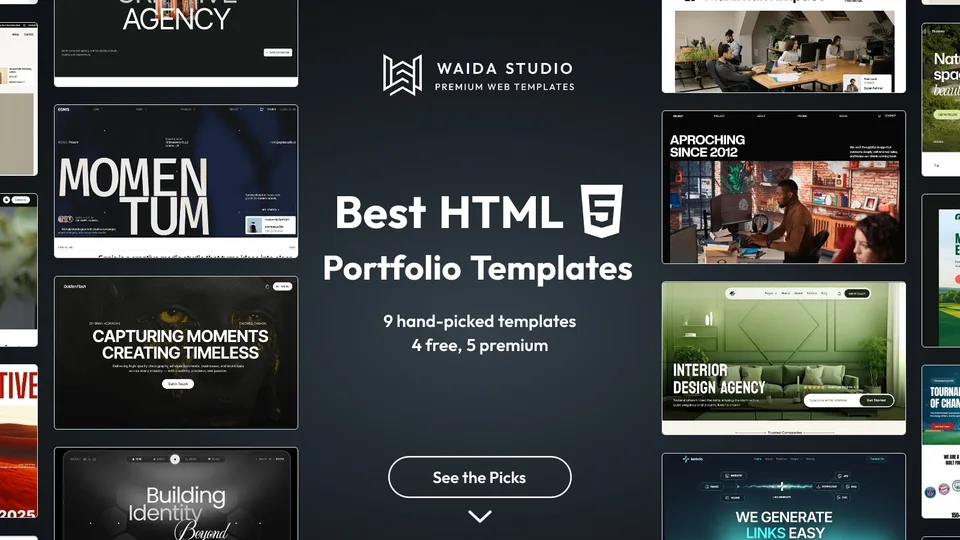
The best HTML portfolio templates in 2026 are Formix and Obliq Studio for designers and small studios, Egnis for filmmakers, Golden Flash for photographers, Minux for branding studios, Zelda if you want one free, and Start Bootstrap's Freelancer and Resume or HTML5 UP's Strata if you want an open-source starting point.
Bias disclosure: 6 of these 9 are Waida Studio templates; we made them. The other three are open-source templates we earn nothing from, checked on GitHub and on their own sites today. Prices and licence terms below are what each page said when we checked.
How We Picked
- Plain HTML and CSS you can open in an editor. No site builder account, no build step required to change a heading or swap an image.
- Built for showing work. A work index or case-study pages, not a business template with a gallery added at the end.
- A licence you can read. Each pick says what you can do with it commercially, and whether you have to credit the author.
- Range. Designers, studios, photographers, filmmakers and developers each get at least one pick, at prices from free to $39.
The 9 Picks at a Glance
Template | Best for | Price |
|---|---|---|
Formix | Designers and small studios | $39 |
Egnis | Filmmakers and videographers | $39 |
Golden Flash | Photographers and visual artists | $39 |
Minux | Branding studios and design teams | $39 |
Obliq Studio | Independent creators with a bold style | $39 |
Zelda | Studios that want a free, multi-page start | Free (Waida account) |
Freelancer by Start Bootstrap | One-page portfolio for a freelancer | Free (MIT) |
Resume by Start Bootstrap | Developers who want a CV-style site | Free (MIT) |
Strata by HTML5 UP | A minimal profile with a work grid | Free (credit required) |
The 9 Best HTML Portfolio Templates
1. Formix — Premium

Formix is made for creative professionals, design agencies and studios who need to present projects, services and the people behind them. It has 15 pages, so your project pages, a services page and an about page are already laid out.
It suits a designer whose portfolio also has to sell a service. The HTML version is $39; the same design is free on Framer with a free Waida account, and $79 on Webflow.
2. Egnis — Premium

Egnis is a portfolio for filmmakers, videographers and film and TV creators, with cinematic layouts across 13 pages. It is laid out for work that is mostly moving image, where each project needs a large frame and a short credit list.
In HTML, video is whatever you embed: a hosted file or a player from Vimeo or YouTube. The HTML version is $39.
3. Golden Flash — Premium

Golden Flash is a dark template with bold typography for photographers, studios and visual artists, across 11 pages. It is the pick when your work is mostly still images and you want them shown large.
Photographers should compress images before upload, because a static site serves exactly the files you give it. The HTML version is $39.
Check out Golden Flash template
4. Minux — Premium

Minux is a dark, monochrome template for creative studios, branding agencies and design teams. It covers services, case studies, a journal and pricing, with running ruler marquees and slow, continuous motion.
It is our newest portfolio template and suits a studio that sells branding work and wants the site to feel as considered as the work. The HTML version is $39.
5. Obliq Studio — Premium

Obliq Studio is a bold, contemporary template for creative agencies, design studios and independent creators, across 15 pages. It leans on large type and confident layouts, so it suits work that can carry a strong frame.
The HTML version is $39; Framer and Webflow versions are $79 each.
Check out Obliq Studio template
6. Zelda — Free

Zelda is a dark template for creative studios, agencies, portfolios and creative professionals, with 13 pages. It is one of two Waida templates that are free on every platform, including HTML, and its Figma file is free too.
Free means free with a free Waida Studio account: sign in, then download the HTML zip. It carries the same licence as the paid templates.
7. Freelancer by Start Bootstrap — Free [External]
Freelancer is a one-page Bootstrap portfolio theme from Start Bootstrap, released under the MIT licence. The current version is built on Bootstrap 5.
It is the pick for a freelancer who needs a single page with a portfolio grid, an about section and a contact form layout, and who is comfortable with Bootstrap's classes. The ready-to-host HTML is in the repository's dist folder; the sources are written in Pug, with build scripts if you prefer to work that way.
8. Resume by Start Bootstrap — Free [External]
Resume is a CV-style Bootstrap theme from Start Bootstrap, also MIT-licensed and on Bootstrap 5. It puts your experience, education and skills in one scrolling page with a side navigation.
It suits developers whose portfolio is mostly a résumé with links to repositories. If you need case studies with images, pair it with a project page of your own or pick a template built around work.
9. Strata by HTML5 UP — Free [External]
Strata is a simple responsive template by HTML5 UP: a profile header beside a "Recent Work" grid. HTML5 UP releases its templates under the Creative Commons Attribution 3.0 licence, which allows personal and commercial use as long as you credit HTML5 UP.
It is a quick, honest starting point for someone with six to twelve pieces to show. Keep the credit in the footer unless you buy an attribution-free licence from the author.
What to Look For in an HTML Portfolio Template
Look for a template whose project page fits your work, then check the licence, the page count and how much JavaScript it relies on. Those four things decide how much editing you will do before launch.
Check | Why it matters | What good looks like |
|---|---|---|
Project page layout | You will duplicate it once per project | Room for a large image or video, a short brief and credits |
Licence | Client and commercial use vary by source | Commercial use allowed; attribution terms stated plainly |
Page count | Every extra page is HTML you maintain by hand | Work index, project, about and contact as a minimum |
JavaScript | Animations should not block reading the page | Content readable with scripts slow or off |
Fonts and images | They make up most of the page weight | Web fonts included or linked; images you can swap easily |
Our guide to designing a portfolio website covers the project page in more detail, and the portfolio website examples show how working designers structure theirs.
HTML, Framer or a Code Framework?
Pick HTML if you are happy editing files and want a site with no platform subscription. Pick Framer or Webflow if you want to edit visually and publish new projects without touching code, and a framework like Next.js or Astro if you want components and a build step.
A static HTML portfolio has no CMS, so adding a project means copying a project page and editing it. That is fine for a portfolio that changes a few times a year. If you publish work every week, a CMS saves time.
Hosting is where HTML wins. GitHub Pages is available for public repositories on GitHub Free, and Netlify, Cloudflare Pages, Vercel or ordinary shared hosting will all serve static files. Every Waida portfolio template is also sold as Astro templates and Next.js templates if you want a framework later.
Developers choosing between a hand-built site and a template can read our developer portfolio website guide.
What You Get with a Waida HTML Template
Each Waida HTML template is a source zip of the finished site: HTML pages, CSS, the JavaScript its interactions need, images, fonts and a readme. Paid templates are $39 each, or every HTML template is $99 once in the HTML Bundle.
There are 41 HTML templates in the catalogue today, two of them free (Zelda and Medonix). The licence covers one person and unlimited projects, personal, commercial and client work, with no credit required; the full wording is in our terms. Figma files are not included with a template purchase; they are $19 each or in the Figma Bundle, except Zelda's and Medonix's, which are free.
If you would rather not edit the files yourself, our customisation service will set the template up with your content. For access to more than one template over time, compare the Pro and Ultra plans on the pricing page.
Templates to start from
All 42 templates




Frequently asked questions
What is an HTML portfolio template?
It is a ready-made portfolio website written in plain HTML, CSS and a little JavaScript. You replace the text and images with your own, then upload the files to any static host.
Can I use an HTML portfolio template for client work?
It depends on the licence. Waida Studio's licence covers unlimited personal, commercial and client projects with no credit. MIT templates allow commercial use, and HTML5 UP's CC BY 3.0 templates require a credit.
Where can I host an HTML portfolio for free?
GitHub Pages hosts static sites from public repositories on GitHub's free plan. Netlify, Cloudflare Pages and Vercel also serve static files; check each host's current plan limits before you launch.
Do I need to know how to code to use an HTML template?
You need enough HTML and CSS to edit text, swap images and copy a page. An AI coding assistant can help with edits, because the files are plain HTML and CSS.
Are there free HTML portfolio templates from Waida Studio?
Yes. Zelda and Medonix are free on every platform, HTML included, with a free Waida Studio account. Zelda is the one built for studios and portfolios.
Is HTML or Framer better for a portfolio?
HTML is better if you want no platform subscription and are happy editing files. Framer is better if you want to edit visually and add projects through a CMS without code.
For most designers the quickest route to a finished HTML portfolio is Formix or Obliq Studio; photographers should look at Golden Flash, filmmakers at Egnis, and branding studios at Minux. If you want to start for free, Zelda gives you a full multi-page site, while Freelancer, Resume and Strata are good open-source starting points if you are comfortable doing the design work yourself.
Browse every portfolio website template on Waida Studio. Each one is $39 as HTML, or $99 for the whole HTML Bundle, and Zelda is free with a free account.

More from Kazi
Related articles
More in Use Cases
Restaurant Website Design: What a Restaurant Site Needs in 2026
What a restaurant website needs in 2026: hours and address on the first screen, a menu in text, one booking button, direct online ordering and fast photos.
Photography Website Design: What to Include in 2026
What good photography website design looks like in 2026: the pages, fast galleries, client proofing, image SEO, copyright and where to build it.
Personal Portfolio Website: What to Include in 2026
What a personal portfolio website needs in 2026: the sections, one page or several, a domain with your name, where to build it and a launch checklist.