Premium vs Free Website Templates: Which Should You Choose in 2026?
Premium vs free website templates in 2026 — what's actually included, hidden costs of free, and when each is genuinely the right choice. From a template studio.
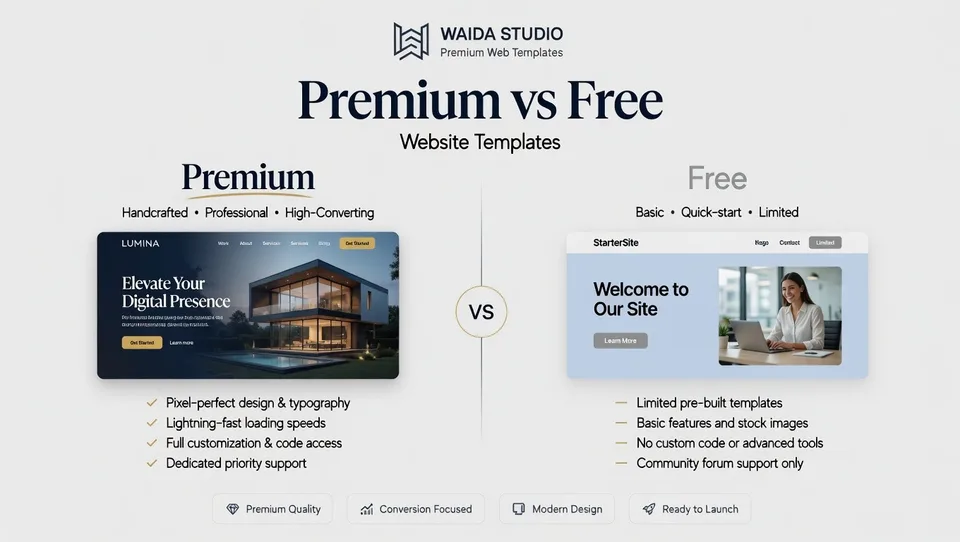
Free templates are right when the project is small, temporary, or learning-focused; premium templates are right when it is commercial, long-term, or your time is worth more than the price difference. They are different products, not different price points: a free template is a starting framework, a premium one a complete website system with CMS structure, documentation, support, and updates.
This guide breaks down what's actually included in each category, the hidden costs of "free," when premium is genuinely worth paying for, and when free templates are the smarter choice. We've written this from a template studio's perspective — Waida Studio sells premium Webflow and Framer templates, so we benefit when readers buy premium. We've tried to write the version we'd want to read if we were on the buying side: honest about when free is the right answer, specific about what premium actually delivers.
At a glance
Free templates | Premium templates | |
|---|---|---|
Price | $0 | $30–$200+ (typical) |
Design quality | Variable, often generic | Polished, distinctive, production-grade |
CMS structure | Basic or minimal | Full CMS with reference fields, dynamic pages |
Inner pages | Often few or missing | Complete site (homepage + 5–10+ inner pages) |
Documentation | Limited or absent | Comprehensive setup guides |
Support | Community forums (slow, optional) | Direct email support from creator |
Updates | Rare or abandoned | Regular updates as platforms evolve |
License | Often restrictive (no commercial use) | Standard commercial license included |
Customization | Manual code changes often required | Designed for visual customization |
Security review | Variable; some marketplaces verify | Verified by marketplace + creator |
Best for | Learning projects, prototypes, hobby sites, tight budgets | Client work, commercial sites, long-term projects, brand-led businesses |
What you actually get with a free template
Free templates have improved significantly. The 2026 ecosystem includes legitimately good free options on platform marketplaces (Webflow Marketplace, Framer Marketplace), open-source libraries (Bootstrap themes, Tailwind UI free components), and aggregator sites (Colorlib, ThemeForest's free section, designer giveaways). For specific use cases, a free template will get you to a publishable site without spending a dollar.
What's actually included with a typical free template:
- A homepage design. Usually polished, with at least one hero variant.
- One to three inner pages. About, contact, maybe a basic services page.
- A basic responsive layout. Mobile and tablet adaptation, sometimes only on desktop-first.
- A simple style system. Limited color palettes and typography options.
- Basic SEO metadata fields. Title, description, often nothing more.
What's typically not included:
- A complete inner page set. Most free templates skip detailed services pages, individual project pages, blog post layouts, or use-case-specific pages.
- A fully built-out CMS. Free templates often include only the most basic CMS structure — a single blog collection at most. Reference fields, multi-collection structures, and dynamic page templates are usually absent.
- Setup documentation. You're left to figure out CMS connections, form configurations, and customization on your own.
- Email support. If something breaks, you're posting in community forums and hoping someone replies.
- Updates. Most free templates are uploaded once and abandoned. When platforms update or new features ship, the template doesn't evolve with them.
- A commercial license. Many free templates restrict commercial use, prohibit client work, or require attribution. Read the license before using a free template for a paid project.
What you actually get with a premium template
Premium templates from professional studios are different products. The price reflects what's actually included, not the design alone.
What's typically included with a quality premium template:
- A complete site. Homepage plus 5–15 inner pages — all designed, structured, and ready to populate. You're not building out missing pages from scratch.
- A full CMS structure. Multiple collections, reference fields, dynamic page templates, and editorial workflows already configured. For a blog template, that means working article structure with categories, tags, and authors. For an agency template, that means case study collections with client references and project filtering.
- Setup documentation. Step-by-step guides covering platform setup, customization, and common changes. Some studios include video walkthroughs.
- Direct email support. When something doesn't work as expected, you email the creator and get a response — typically within 24–48 hours.
- Free updates. When the platform adds new features, modifies CMS behavior, or releases breaking changes, the template gets updated. You re-download the latest version.
- A standard commercial license. Use on an unlimited number of projects, your own and your clients', under a licence held by one person. Some studios offer all-access subscriptions for unlimited use across projects.
- Polished design quality. Premium templates compete on aesthetics. The bar is significantly higher than what most free templates achieve.
- The matching Figma file. Most professional template studios offer the design source, either included or as a separate purchase, for customization before or after development.
The price difference reflects real labor: design time, CMS engineering, documentation writing, support infrastructure, and ongoing maintenance. A premium template at $129 represents tens of hours of professional work; the price covers that labor plus a small margin.
The hidden costs of free templates
The "free templates are free" framing misses real costs that show up later. They're predictable enough that we treat them as part of the buying decision.
Time spent fixing limitations. A free template missing a services page or a properly configured CMS doesn't save you money — it shifts cost from money to time. Building out missing pages, configuring CMS structure, and integrating forms typically takes 10–40 hours for a non-developer. At any reasonable hourly value, that's worth more than a premium template.
No support when things break. When a form stops submitting, a CMS reference breaks, or a platform update changes behavior, free templates leave you to figure it out alone. Community forums help sometimes; often they don't.
Abandoned codebases. Many free templates are uploaded once and never updated. When the underlying platform evolves, the template starts breaking in ways the original creator isn't around to fix.
License restrictions you find too late. Free templates often prohibit commercial use, client work, or modification beyond a certain scope. Discovering this after building a client project is a real problem.
Generic aesthetic. Free templates are downloaded by thousands of users who all make similar customizations. The result: sites that look similar to other sites in the same vertical. For brand-led businesses, this aesthetic dilution is a real cost.
Missing CMS infrastructure. A free template with a "blog" usually means a single CMS collection with a few fields. A premium template's blog includes proper categories, tags, author references, related-post logic, and a functioning archive structure. The difference matters when you actually try to publish content at any scale.
None of these costs are dealbreakers individually. Together, they explain why most people who start with free templates eventually move to premium for their next serious project.
When free templates are the right choice
Free templates are genuinely the smarter choice when:
- You're learning the platform. Free templates are excellent for understanding how Webflow, Framer, or any builder actually works. Tearing one apart teaches you more than a tutorial.
- The project is temporary. A one-time event site, a 3-month landing page, or a hobby blog doesn't justify premium pricing. Free is fine.
- You're a developer comfortable with code. If you can extend, fix, and maintain a free template yourself, support and updates matter less.
- The site is small and static. A two-page personal site or a basic portfolio with a few projects works fine on a free template.
- You're prototyping or validating. Pre-launch concept testing, MVP validation, or quick-and-dirty experiments don't need premium production quality.
- Budget is genuinely the constraint. If $129 is materially difficult, a free template plus your time investment is a reasonable trade-off.
When premium templates are the right choice
Premium templates are worth the cost when:
- The site is commercial and long-term. A business website, agency site, or SaaS marketing page that needs to perform reliably for years is worth $100–$200 of upfront investment.
- You're working with clients. Client deliverables benefit from premium production quality, complete CMS structure, and the support that comes with the template if something breaks during the project.
- Brand differentiation matters. Premium templates from professional studios deliver designs that don't look like every other site in the vertical. For brand-led businesses, this matters.
- You don't have time to fill in gaps. Premium templates ship complete; you populate content and customize. Free templates often need 10–40 hours of additional build work to reach the same state.
- You need a working CMS. For content-heavy sites — blogs, case studies, resource centers — premium templates ship the CMS infrastructure that free templates skip.
- You want platform updates handled. Premium templates evolve with platform releases. Free templates often don't.
- The license matters. Building client work on a free template with restrictive licensing creates legal and operational risk. Premium templates ship with clear commercial licenses.
How to evaluate a premium template before buying
Premium templates aren't all equal. Some studios ship complete, well-documented systems; others ship something closer to a free template with a price tag. Before buying any premium template, check:
Inner page completeness. Look at the live preview. Are there 5–15+ inner pages, or only the homepage with placeholder inner pages? Inner page depth is the single best predictor of whether a template is genuinely complete.
CMS structure. If the template includes a blog or any dynamic content, check whether it ships with a full CMS configuration (collections, reference fields, dynamic page templates) or just a single basic collection.
Documentation visibility. Quality template studios link to setup documentation from the product page. If you can't find documentation before purchase, expect minimal support after.
Update history. Check when the template was last updated. Templates updated within the last 6 months are actively maintained. Templates last updated 18 months ago may be abandoned.
Support promises. Look for explicit support terms — email support, response time commitments, support duration after purchase. "Community support" usually means no real support.
License clarity. Confirm the license covers your intended use (own site, client project, agency portfolio). If the license isn't clearly published, ask before buying.
Real customer evidence. Reviews, customer counts, and visible portfolio examples of templates in actual production use are stronger signals than design polish alone.
The middle ground: paid platform templates vs. studio templates
Not all paid templates are the same. The category includes two distinct sub-types worth understanding.
Platform marketplace paid templates (Webflow Marketplace, Framer Marketplace) are sold by individual creators through the platform's official store. Quality varies widely — some are excellent, others are minimally finished. Support depends entirely on the creator. License terms are platform-standard. Average price: $49–$129.
Studio templates are sold by template studios as a focused product line. Studios invest in design quality, documentation, support infrastructure, and ongoing updates because templates are their business. Quality is more consistent. Support is typically faster and more responsive. License terms are usually more flexible. Average price: $79–$249.
Both categories are legitimate; they're optimized for different things. Marketplace templates often have lower prices and broader variety. Studio templates often have higher quality, better support, and more thoughtful design systems. The right choice depends on what you value.
Decision matrix
Your situation | Recommended | Why |
|---|---|---|
Personal hobby blog | Free | Low stakes, low complexity, no commercial component |
Learning the platform | Free | Tearing apart free templates teaches the platform |
Two-page portfolio (3 projects) | Free | Project size doesn't justify premium pricing |
Designer portfolio (10+ projects, blog) | Premium | CMS structure and design quality matter |
Small business website (services + contact) | Premium | Long-term commercial use, support matters |
Agency website | Premium | Brand differentiation, client perception |
SaaS marketing site | Premium | Production quality, complete inner pages, CMS depth |
Side project or MVP | Free | Validation phase, reusable for next project later |
Client deliverable | Premium | License clarity, support, production quality |
Startup landing page (pre-launch) | Free, then upgrade | Fine for pre-launch; revisit for production |
Real estate or directory site | Premium | Complex CMS structures justify premium pricing |
Restaurant or local business | Free or platform builder | Often simple enough for free options |
Both are here to compare: the free templates are complete rather than cut down, and the full catalogue shows what the paid ones add. Plans and bundles are the third option when you build regularly.
Frequently asked questions
Are free templates safe to use?
Mostly yes, with caveats. Templates from official platform marketplaces (Webflow, Framer, WordPress.org) go through review processes and are generally safe. Templates from random aggregator sites or unfamiliar GitHub repositories sometimes contain malicious code, tracking scripts, or licensing issues. Stick to official marketplaces and well-known free template sources, and review the license before using a free template for a commercial project.
How much do premium templates typically cost?
Premium templates range from $30 for entry-level designs on large marketplaces (ThemeForest, Webflow Marketplace) to $250+ for premium studio templates with complete CMS structure and ongoing support. Most quality premium templates fall in the $79–$199 range. All-access subscriptions to template studios run $99–$299/year for unlimited use across projects.
Can I use a free template for client work?
It depends on the license. Many free templates restrict commercial use, prohibit client work, or require attribution. Read the license carefully before using any free template for paid client work. If the license isn't clear, don't use it commercially. Premium templates almost always ship with explicit commercial licenses that cover client projects. Waida Studio's free Framer templates are the exception: they are licensed for commercial and client work, with no credit required.
Why are premium templates so expensive compared to free ones?
The price reflects what's actually delivered. A quality premium template represents tens of hours of professional work — design, CMS engineering, documentation writing, support infrastructure, and ongoing maintenance. The price covers that labor. Free templates skip most of this work; that's why they're free, and why they often need significant additional work from the buyer to reach the same finished state.
Will a premium template make my site rank better in search?
Templates don't directly affect search rankings — content, site structure, backlinks, and technical SEO matter far more. But premium templates often ship with better SEO infrastructure (clean code output, proper schema markup, faster loading, structured metadata fields) that gives you a more solid foundation than typical free templates. The compounding effect over time is real but indirect.
What's the lifetime cost difference between free and premium?
For a serious commercial site over 3 years: a free template's apparent $0 cost typically translates to 20–60 hours of additional time on missing pages, CMS configuration, debugging, and platform-update fixes. At any professional hourly rate, this exceeds the cost of a $129–$199 premium template by an order of magnitude. For non-commercial or short-lived sites, the calculation reverses — free is genuinely cheaper because you don't need what premium delivers.
Looking for premium templates? Browse our Webflow templates and Framer templates — 47+ designs across portfolios, agencies, SaaS, business sites, and real estate. Every Waida Studio template includes the full template, matching Figma file, complete inner page set, full CMS structure, setup documentation, email support, and free updates. Plans start at single-template purchases or our Pro plan from $12 a month, or a platform bundle for unlimited use on one platform.
Need a template customized to your brand? Our Customization service handles it for $499. For fully bespoke builds, our Custom Website service starts at $5,000.
Pillar guides:

More from Kazi
Related articles
More in Comparisons
Framer vs Wix: Which Builder Is Right for Your Site in 2026?
Framer vs Wix in 2026 — design control, e-commerce, AI features, learning curve, and pricing. Honest comparison from a Framer studio.
Framer vs Figma Sites: Which Is Right for Your Site in 2026?
Framer vs Figma Sites in 2026 — production maturity, design environment, CMS, animations, and pricing.
Template vs Custom Website: Which Should You Choose in 2026?
Template vs custom website in 2026 — real costs, timelines, and when each is worth it. Plus the middle path of template customization that most articles miss.